
Storage performance often makes the difference between a sluggish virtual environment and a high‑performing one. In this benchmark, I tested the Huawei OceanStor Dorado 3000 V6 — an all‑flash enterprise storage array — within a Proxmox VE 9.0.4 virtualized environment. The goal? To compare NFS, iSCSI, and iSCSI Multipath (MPIO) configurations.
The results? iSCSI MPIO crushed it — delivering over 500 000 IOPS with ultra‑low latency.
🛠️ Test Lab Configuration
To replicate a realistic data‑center setup, the following hardware and software were used:
| Component | Specification |
|---|---|
| Servers | 2 × HPE ProLiant DL380 |
| CPU | 2 × Intel® Xeon® Gold 5418Y |
| Memory | 512 GB RAM |
| System Disks | 2 × 960 GB SSD in RAID 1 |
| Storage | Huawei OceanStor Dorado 3000 V6 (4 × 10 GbE per controller) |
| Networking | Redundant 25 GbE iSCSI and NFS VLANs |
| Hypervisor | Proxmox VE 9.0.4 |
| VMs | Debian‑based, using fio 3.39 |
| Drivers | VirtIO‑SCSI & VirtIO‑Net |
| Benchmark Tool | fio (Flexible I/O Tester) |
📈 Benchmarking Methodology
To simulate both large data transfers and typical virtualized workloads, two fio profiles were used:
Sequential Read/Write (1 M block)
fio --rw=rw --bs=1M --iodepth=16 --size=10G --runtime=60 ...
Random Read/Write (4 K, 70/30 mix)
fio --rw=randrw --rwmixread=70 --bs=4k --iodepth=32 ...
📊 Performance Summary
| Protocol | Sequential R/W | Random R/W | IOPS | Avg Latency |
|---|---|---|---|---|
| NFS | 2.3 GB/s | 30 MB/s | ~7.7 K | 5–10 ms |
| iSCSI (Data Protect) | 8.8 GB/s | 530 MB/s | ~120 K | 0.6 ms |
| iSCSI (Normal) | 8.0 GB/s | 520 MB/s | ~120 K | 0.6 ms |
| iSCSI MPIO (mpath0) | 3.0 GB/s | 7.2 GB/s | ~580 K | 0.07 ms |
| iSCSI MPIO (mpath1) | 3.4 GB/s | 6.7 GB/s | ~350 K | 0.08 ms |
📌 Highlight: MPIO achieved over 500 000 IOPS with sub‑0.1 ms latency — exceptional for virtual machines and database workloads.
📉 Visual Performance Chart
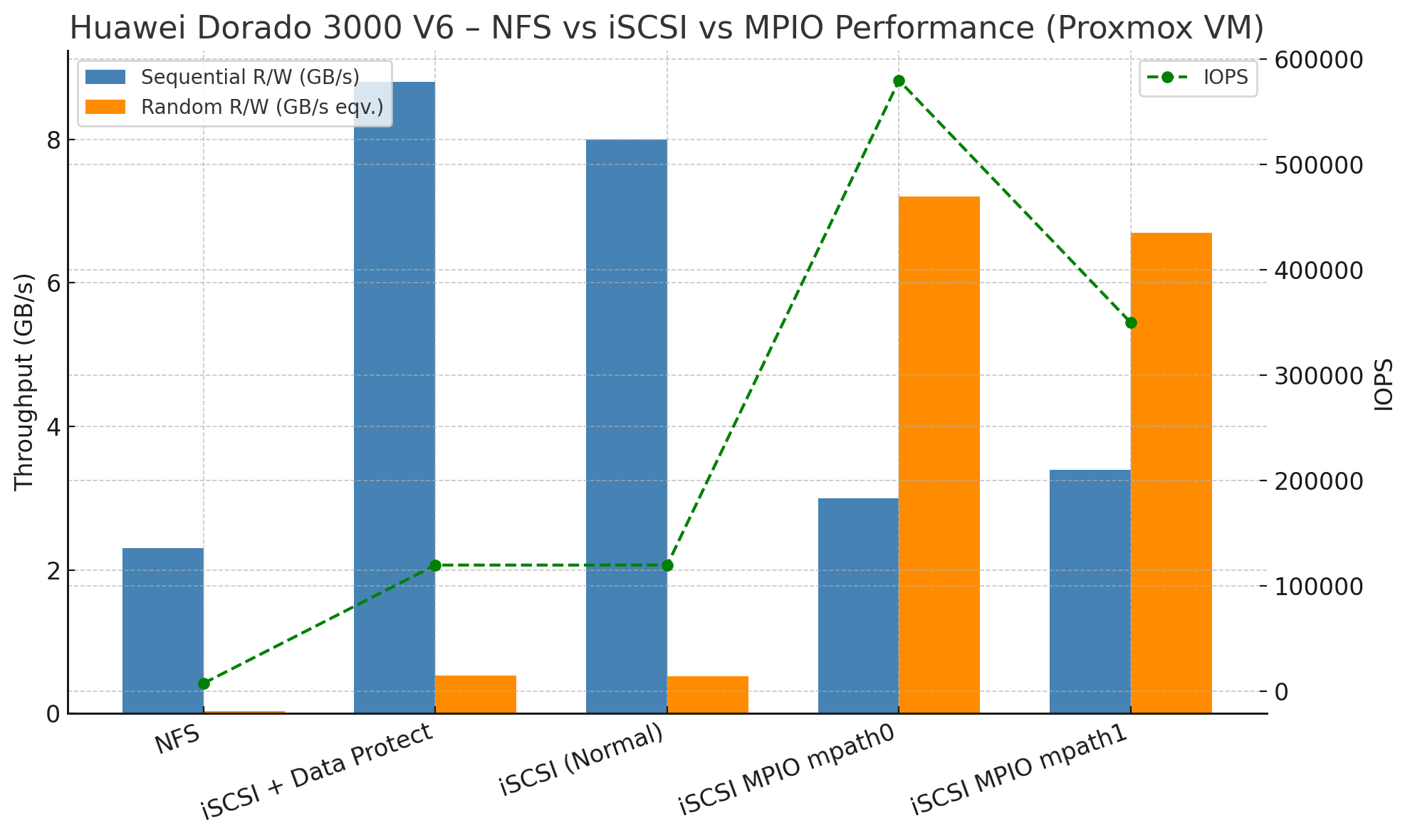
Side‑by‑side throughput & IOPS comparison of NFS vs. iSCSI vs. MPIO
🔍 Observations & Insights
NFS
- Offers decent sequential performance, but random I/O becomes a bottleneck.
- Caused by single‑threaded metadata operations.
- ✅ Best suited for archival or light‑use workloads.
iSCSI (Single Path)
- Nearly fully utilizes array performance.
- Low latency (< 1 ms) — ideal for production VMs.
- Minimal overhead even with Data Protection enabled.
iSCSI MPIO
- Utilizes both 25 GbE links simultaneously.
- Delivers enterprise‑class random I/O performance.
- Best choice for latency‑sensitive VMs and clustered databases.
🧰 Recommended Tuning
Multipath Configuration (/etc/multipath.conf)
defaults {
  user_friendly_names yes
  polling_interval 5
}
devices {
  device {
    vendor "HUAWEI"
    product "XSG1"
    path_grouping_policy multibus
    path_checker tur
    no_path_retry queue
    rr_min_io_rq 1
    rr_weight uniform
  }
}
NFS Mount Example
mount -t nfs -o vers=4.1,nconnect=8,noatime,rsize=1048576,wsize=1048576 <server>:/volume /mnt/test
Performance Optimization
echo none | tee /sys/block/sdX/queue/scheduler
echo 3 | tee /proc/sys/vm/drop_caches
✅ Conclusion
The Huawei Dorado 3000 V6 proves to be a powerful and efficient storage backend for Proxmox VE environments. While NFS is easy to set up, it’s not suitable for workloads with demanding random I/O. On the other hand, iSCSI — especially when paired with MPIO — unleashes the full potential of this all‑flash array.
Summary
- Top performer: iSCSI MPIO — over 500 000 IOPS with latency below 0.1 ms
- Good choice: iSCSI single path for smaller or less demanding setups
- Use with caution: NFS for workloads involving heavy random I/O
If you’re building a high‑performance virtualized infrastructure, Huawei Dorado 3000 V6 with properly tuned iSCSI multipath is a clear winner.
🔁 (Optional) fio Benchmark Script
#!/bin/bash
DISK="/dev/mpath0"
RUNTIME=60

fio --name=seq_rw --rw=rw --bs=1M --numjobs=1 --iodepth=16 --size=10G --runtime=$RUNTIME --filename=$DISK --direct=1 --ioengine=libaio --group_reporting --output=seq_rw.log

fio --name=randrw --rw=randrw --rwmixread=70 --bs=4k --numjobs=4 --iodepth=32 --size=10G --runtime=$RUNTIME --filename=$DISK --direct=1 --ioengine=libaio --group_reporting --output=randrw.log
Want to know how to set this up in your environment? Drop a comment or get in touch!